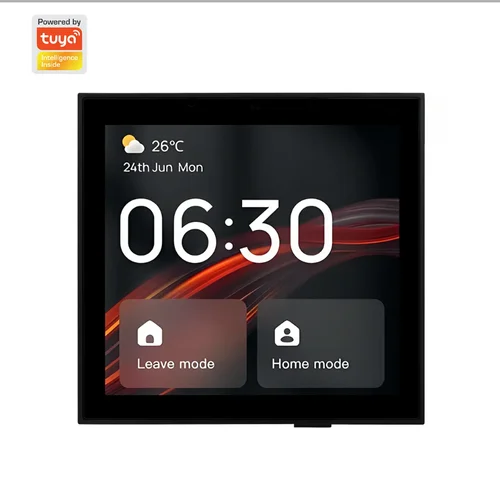
This product is suitable for indoor public spaces and integrates a multi-functional central control that integrates control, interconnection, entertainment, and security.
Compatible with a variety of product forms, it adopts a standard 86 in-wall base design or a desktop base, and is used with wall brackets to fix the central control host panel and hang it on the wall. It mainly provides gateway function, scene panel, device video interconnection, music playback, and other functions. Users can control and manage different types of smart devices under the account through physical buttons, screen, voice, and other interactive methods.
2. Features
1. Zigbee & Bluetooth Gateway
Zigbee and Bluetooth independent chips, integrate Zigbee and Bluetooth gateway functions, support Bluetooth BLE & BLE mesh sub-devices, and have edge capabilities for localized control.
2. Device control
Fully compatible device access and diversified control forms are compatible with almost all Tuya ecological devices.
3. Scene control
Custom physical buttons, screen interaction, and voice interaction can trigger
scenes to meet different needs in life.
4. iShare technology _
In-depth customization of the interconnection center, support for IPC preview monitoring, video and voice calls, and direct interconnection between central control and central control, and central control and APP.
5. T- Control Technology
The product comes with 4 custom buttons to support custom associated devices and scenes; it has also developed a shortcut panel for commonly used devices, with multiple controls on one screen, allowing you to enjoy intelligence.
6. Rich interface
A variety of base forms are supported; the standard base uses zero-fire wire wiring, supports dual relays, RJ45 network port, RS485, etc.
7. Building an intercom
The product has a built-in building intercom interface, which can be connected to the video intercom system, elevator control, access control, and property information ; ( need to be combined with Tuya Community SaaS ).
3. Product Specifications
3.1 Product function diagram
|
|
|
|
|
|
|
|
|
|
|
|
|
|
|
|
1920×1200 FHD 10.1-inch touch screen
|
5%-90%RH (non-condensing)
259×161×13mm (without base)
259×161×37mm (including base)
3.2 Introduction to Hardware Specifications
|
|
|
|
|
|
|
|
|
|
|
|
|
|
|
Quad-core ARM CortexTM-A35
|
|
|
|
|
|
|
|
|
|
|
|
100 ~ 240 VAC( ± 10%), 50/60Hz +-3Hz neutral wire
1*100M RJ45 (EU not included)
Multi-touch capacitive screen, anti-fingerprint coating
With physical occlusion paddle, camera
Dual base solution (6pin bottom box)
Dual base solution (10pin bottom box)
100-240V 50/60HZ 10A (two relays)
RJ45 network port×1 (EU not included)
485 interface × 1 (EU not included)
100-240V 50/60HZ 10A (two relays) (EU not included)
Single solution (12pin bottom box)
Interface (EU not included)
|
|
RS485 interface × 1 (EU not included)
|
3.3 Software function introduction
Scan code to authorize login
Pull down notification control center
Status notification toast
Central Control OS Interaction & Home Page
Device scene control function
Device and scene custom components
Main page position sorting addition and deletion management
Physical buttons to control devices & scenes
Support all Tuya ecological equipment control , including group , infrared
Support one-click execution
Support LAN control device
Support LAN control one-key execution scenarios
128+ sub-devices supporting Zigbee communication type network access ( lab environment )
Support 128+ sub-devices of BLE/SigMesh type to access the network ( lab environment )
Zigbee&Bluetooth gateway function
Control Panel MAX
Support LAN device and scene control
Support local linkage across gateways and communication protocols
Support Bluetooth device pairing, file transfer
Support Bluetooth audio output
4 custom physical buttons , associated with any device and scene
Quick panel device control , multi-control on one screen
Support IPC device preview, pull stream view
Support intercom with IPC
Support local camera image streaming, view real-time video on the APP side
Audio and video interconnect calls with other devices
Featured functions ( need to be combined with Tuya Community SaaS )
4. Installation Guide
4.1 Installation preparation _
Support mainstream video intercom manufacturer equipment
|
Access control system , can be linked to open the door
|
1) This product is powered by the neutral wire, please arrange the neutral wire in advance;
2) This product is connected to the network through Wi-Fi or Ethernet, please arrange the WiFi network or Ethernet cable in advance;
3) If you want to use the relay, RS485, security network port of this product, please preset the relevant cables in advance;
4) To ensure electrical safety and wireless performance, please use a plastic box that meets the JB/T 8593 standard or a depth of more than 40mm .
5) Please bring your own screwdriver, test pen, electrical tape and other tools, please do not operate with electricity.
4.2 Installation Instructions
1) Turn off the main power switch, and use a test pen to confirm that the live
Control Panel MAX
wire of the cassette is not charged;
2) Connect the base correctly, make sure that the copper wire and the terminal
are well released, and there is no exposed wire;
3) Make sure the base bracket is complete , drill 4 holes on the wall according to the mounting holes of the fixing bracket, and then plug the expansion pipe into
, Fix the bracket and the base as a whole on the wall with screws , and check that the wall of the bracket part is firm and flat ;
4) Insert the upper part of the central control host into the bracket , and then directly magnetically attract the lower part to the bracket to complete the installation and check whether the buckle is in good condition . When taking it out , just pull it out from both sides of the lower part of the main unit .
pay attention
Do not use force when installing the screws, so as not to cause the bracket to be deformed ;
Control Panel MAX
When wiring, the stripping length is about 10mm. Adjust the stripping length according to the actual situation to ensure good release and avoid exposed wires ;
5. packing list
Smart central control screen MAX x1
Wall bracket × 1
In-wall base box for strong electricity × 1 ( optional ) Weak current in-wall base box × 1 ( optional )
Screw bag × 1
Reset pin × 1
Product manual x1



 67,225.00

 Courier delivery
 DHL Courier delivery
 Warranty 1 year
 Free 30-Day returns